

Why the Best Responsive Web Design Sites Matter More Than Ever
Best responsive web design sites are no longer just a nice-to-have—they’re essential for survival in today’s mobile-first world. For Multitouch Marketing’s PPC clients, a responsive landing page can be the difference between a wasted click and a profitable conversion.
Here are the top examples that nail responsive design:
Quick Answer: The Best Responsive Web Design Sites
- Dribbble – Masters fluid grids that shift from 4 columns on desktop to 1 on mobile
- Dropbox – Adapts content and CTAs based on device-specific user intent
- The New York Times – Translates complex multi-column layouts into readable mobile experiences
- Nixon – Creates seamless e-commerce experiences with touch-friendly buttons and simplified checkout
- Etsy – Prioritizes search and personalization on mobile with scaled-down product grids
Why this matters: Over 60% of website visits now happen on mobile devices, and Google’s mobile-first indexing means your site’s mobile version directly impacts your search ranking. If your website doesn’t adapt seamlessly across devices, you’re losing potential customers, PPC budget efficiency, and revenue.
What makes a site truly responsive: The best examples use fluid grids, flexible images, and CSS media queries to create layouts that dynamically change based on screen size—not just shrink down. They prioritize mobile content, ensure touch-friendly navigation, and maintain fast load times across all devices.
The difference between a responsive site and a mobile-friendly one is significant. Mobile-friendly sites simply scale down the desktop version (often requiring pinching and zooming), while responsive sites fundamentally restructure their layout, navigation, and content hierarchy for each device type.
At Multitouch Marketing, we see this play out every day in PPC campaigns: highly responsive landing pages consistently outperform static, desktop-first pages in both user engagement and conversion rates. This guide breaks down what makes these sites great and how you can apply these principles to your own business so every ad click has the best chance to convert.
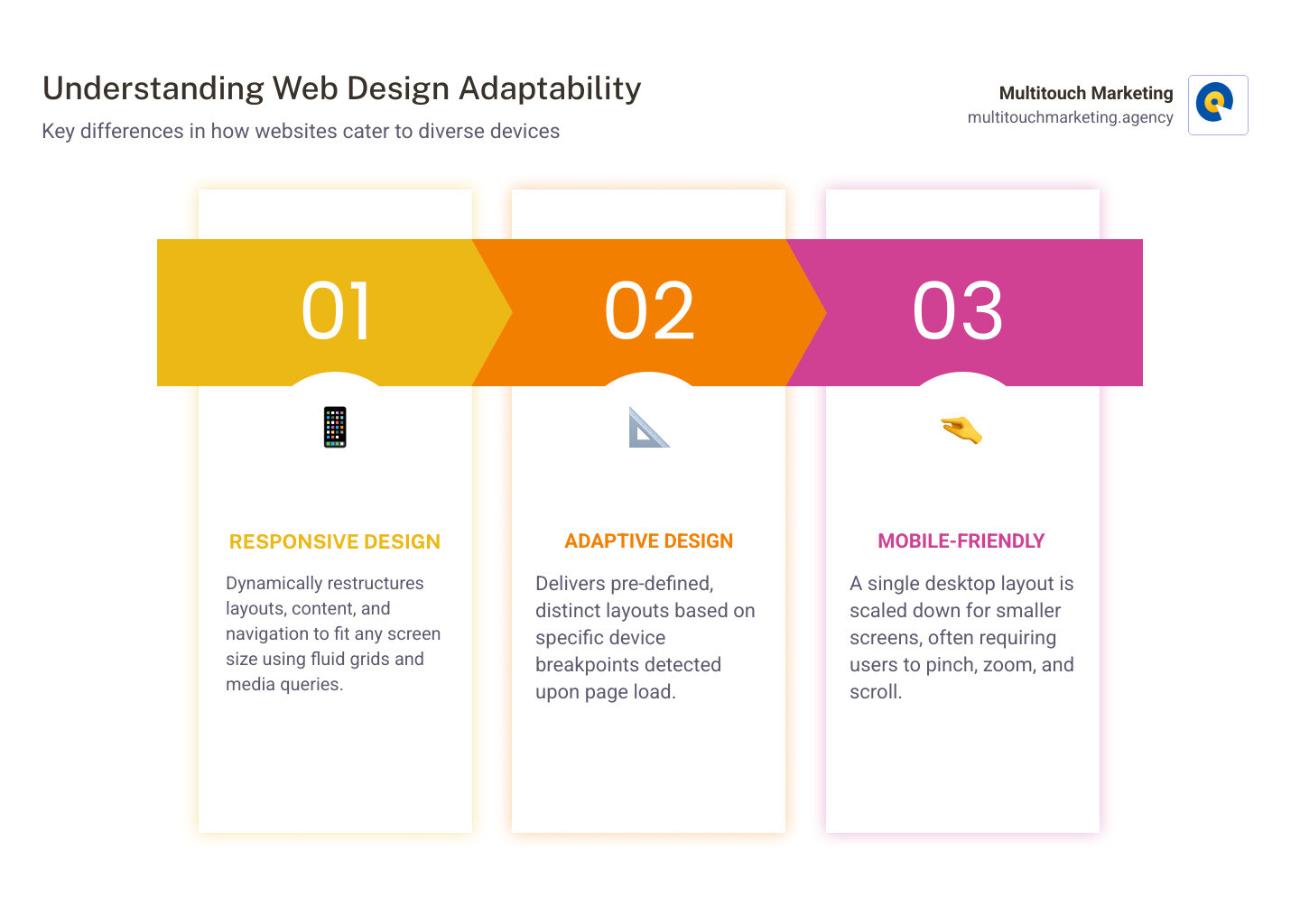
Common responsive web design vocabulary:
What is Responsive Web Design and Why is it Essential?
In today’s digital landscape, websites are accessed on an astonishing array of devices – from the gargantuan screens of desktop monitors to the humble displays of our smartphones. This is where responsive web design steps in, ensuring a seamless and optimal experience for everyone, everywhere.
At its core, responsive web design is an approach to web development that crafts websites to adapt their layout and content based on the size of the user’s viewport. Imagine a chameleon changing its colors to blend into any environment; a responsive website does the same with its design. It is built to dynamically adjust, resize, and reorganize its elements to fit any screen, whether it’s a small mobile device, a tablet, or a large TV. We are talking about one website that works beautifully across all formats, maintaining performance, usability, and visual consistency.
This is not just a design convenience; it is a performance and ROI issue, especially when you are paying for every click in a PPC campaign.
Over 60% of website visits now happen on mobile devices, a percentage that continues to climb. With over 3 billion smartphones in use worldwide, it is clear that prioritizing mobile-friendly websites is a necessity. If your site is not mobile-friendly, it is simply not search-friendly. Google’s mobile-first indexing means the mobile version of your site is the primary determinant of its search ranking. If that version is not up to standard, your visibility in search results will suffer, impacting everything from user acquisition to conversion rates.
Beyond SEO, responsive design fundamentally improves the user experience (UX). No one enjoys pinching and zooming to read text on a tiny screen or endlessly scrolling sideways to find what they are looking for. A responsive site eliminates these frustrations, leading to lower bounce rates, increased engagement, and ultimately, higher conversion rates from both organic and paid traffic. For Multitouch Marketing clients, that means more leads and sales from the same ad spend.
It ensures that your brand looks attractive and is user-friendly on diverse devices, which is a win-win for both your visitors and your business in Raleigh NC, Durham NC, Chapel Hill NC, and across North Carolina. The added benefit is that responsive web design simplifies development by requiring only one version of a website, making maintenance easier and more cost-effective over time.
The Building Blocks of a Truly Responsive Website
How do these digital chameleons actually work? The secret lies in three core technical ingredients: fluid grids, flexible images, and media queries. These components work together to create websites that function flawlessly across devices and support high-converting PPC landing pages.
- Fluid Grids: Forget fixed pixel widths. Fluid grids use relative units like percentages or
ems for element widths. This means instead of a column being 300px wide, it might be 30% of the screen. As the screen size changes, the column scales proportionally. - Flexible Images: Flexible images scale proportionally with their parent elements. By using CSS properties like
max-width: 100%andheight: auto, images automatically adjust without distortion. Modern techniques likesrcsetand the - Media Queries: These CSS superpowers allow a website to “ask” the device about its characteristics like screen width, height, and orientation. Based on these answers, media queries apply different styling rules. For example, a media query might stack two columns vertically on screens less than 768px wide.
These three elements form the foundation of responsive design. Modern layout modules like CSS Grid and Flexbox have revolutionized responsive design further, offering powerful control over element distribution and alignment.
Breakpoints are specific screen size indicators where your website’s layout transforms. Designers typically set these for common device widths – 480px for smartphones, 768px for tablets, and 1024px or 1280px for desktops.
Learn more about Responsive Design fundamentals and explore advanced Responsive Web Design Techniques.
Responsive vs. Fluid vs. Mobile-Friendly Design
The terms “responsive,” “fluid,” and “mobile-friendly” represent distinct approaches to how websites adapt to different screen sizes. Understanding these differences is key for both UX and PPC performance.
| Feature | Responsive Design | Fluid Design | Mobile-Friendly (Adaptive/Separate Mobile Site) |
|---|---|---|---|
| Layout Behavior | Dynamically alters layout, content, and navigation based on screen size. | Stretches and shrinks a single layout proportionally to fit screen size. | Serves a different, simplified fixed layout optimized for mobile. |
| Primary Technology | Fluid grids, flexible images, CSS Media Queries, Flexbox, CSS Grid. | Percentage-based widths, relative units. | Device detection scripts, fixed-width layouts, or separate codebase. |
| User Experience | Optimized and consistent experience across all devices. | Can lead to very long text lines or small elements on extreme screen sizes. | Good experience on specific mobile breakpoint, but can be rigid. |
| Maintenance | Single codebase, easier long-term maintenance. | Single codebase, but limited adaptability. | Multiple codebases, higher maintenance cost. |
| SEO Impact | Highly favored by search engines due to single URL and optimal UX. | Neutral, but can be poor if not combined with responsive techniques. | Less favorable due to separate URLs and potential duplicate content. |
Responsive design is the most comprehensive and flexible approach, providing optimized layouts for every visitor from organic search or paid ads.
Inspiring Examples of the Best Responsive Web Design Sites
Now that we have covered the “what” and “why,” we can look at real sites that execute responsive design extremely well. Seeing real-world examples helps clarify how these principles translate into exceptional user experiences that also support strong PPC and organic performance. The best responsive sites do not just shrink; they rethink and reorganize their content, navigation, and visual elements to suit the specific context of each device. They nail content hierarchy, adapt navigation patterns gracefully, maintain visual consistency, and ultimately drive user engagement.
We have examined a range of interfaces to highlight some of the most effective approaches to responsive design, focusing on innovative solutions and user-centric thinking that make these experiences stand out.
Dribbble: Mastering the Fluid Grid
Dribbble, the popular design platform, is a strong showcase of how fluid grids can improve the browsing experience. On a large desktop screen, you might see a 4×3 grid of portfolio tiles. It is spacious, clean, and allows for quick visual scanning.
When you view Dribbble on a smartphone, the flexible grid layout means those columns dynamically shift. On a wide phone screen the multi-column layout becomes a single, scrollable column. This intelligent content reflow ensures that every portfolio piece remains visible and easy to interact with, aligning well with mobile scrolling behavior. Dribbble also hides its menu options behind a hamburger menu on mobile, decluttering the interface and prioritizing the visual content.
Dropbox: Adapting Content for User Intent
Dropbox takes responsive design further by subtly altering its content and calls-to-action (CTAs) based on what a user might be trying to achieve on a particular device. This is very similar to how a high-performing PPC landing page adapts messaging by context.
On a desktop or tablet, you typically see a full navigation bar with multiple options and a prominent “Sign up for free” CTA. The desktop experience caters to users who might be setting up an account, exploring features in depth, or managing files.
However, when viewed on a mobile device, Dropbox’s landing page simplifies. The full navigation bar gives way to a concise hamburger menu, reducing clutter. The primary CTA may shift emphasis, recognizing that mobile users might be more interested in quickly accessing existing services or understanding pricing on the go. This intelligent content prioritization and custom CTAs ensure that Dropbox provides a relevant experience for users, regardless of their device.
The New York Times: Translating a Complex Layout
The New York Times website is a strong example of how to translate a content-heavy, multi-column newspaper layout into an effective responsive digital experience. The challenge here is substantial: how do you maintain the gravitas and information density of a world-renowned news publication on a small phone screen?
On a desktop, The New York Times uses flexible grids that present a wealth of articles, images, and advertisements in a multi-column format. The layout is designed for deep dives and extensive browsing.
When you switch to a smaller screen, the site reorganizes. Articles and sections that were side by side on desktop stack vertically on mobile, ensuring optimal readability. The content hierarchy is carefully managed, prioritizing headlines and lead images while allowing users to expand or collapse sections as needed. This approach preserves the brand identity of The New York Times while delivering a functional and readable experience on mobile. To understand more about the principles behind such sophisticated adaptations, explore More on responsive design principles.
Nixon: An E-commerce Experience That Converts
For brands like Nixon, which offers watches and accessories, the e-commerce experience must be consistent across all devices to drive conversions. Nixon’s website is a useful example of how responsive design can facilitate a seamless shopping journey, whether you are browsing on a desktop or making a quick purchase on your smartphone.
On any device, Nixon keeps product imagery front and center, with a clear visual hierarchy. On mobile, the site uses features custom for touch interaction: product images scale cleanly, and calls-to-action become touch-friendly buttons that are easy to tap with a typical fingertip size of about 44×44 pixels. The navigation, which might be a full menu on desktop, condenses into a hamburger menu for categories on mobile, simplifying the browsing process.
This kind of thoughtful adaptation ensures that the checkout process is as streamlined as possible, minimizing friction and maximizing the chances of a completed sale. It is the same principle Multitouch Marketing applies when designing PPC landing pages: remove obstacles, focus attention, and make the next step obvious on every screen size.
Best Practices for Effective Responsive Design
Creating a responsive website is not just about making things shrink; it is about making them work better on every device and every traffic source, including PPC. Here are some of the best practices we use to ensure effective responsive design:
- Mobile-First Approach: This is a practical strategy, not just a buzzword. Design for the smallest screen first, which forces you to prioritize content and functionality. Once the mobile experience is solid, scale up, progressively adding complexity and elements for larger screens. This ensures that the most critical information is always accessible to the largest segment of your audience.
- Performance Optimization: Mobile users are often on slower connections. Compress images before uploading them, use modern image formats, and implement lazy loading to ensure fast load times. A responsive site should be quick to load, regardless of device. Faster pages translate directly into better PPC quality scores and lower cost per click.
- Touch Target Size: Make sure all interactive elements, like buttons and links, are large enough (at least 44×44 pixels) and adequately spaced to prevent accidental taps.
- Readability and Font Scaling: Text needs to be legible everywhere. Use relative units like
emandremfor font sizes so text scales fluidly. Pay close attention to line height (generally 1.4–1.6 times the font size) and keep line lengths comfortable (around 50–75 characters) to ensure easy reading. - Content Strategy: Identify what content is absolutely essential on a mobile screen and move secondary information further down the page or behind interactions. This kind of prioritization is especially important for paid traffic landing pages that need to communicate value quickly.
For a comprehensive dive into making your website adapt to all devices, review A guide to responsive design for all devices.
How the Best Responsive Web Design Sites Boost SEO and Conversions
Responsive web design is also a powerful engine for digital marketing results. A great responsive website is inherently designed to boost your search engine optimization (SEO) and significantly improve your conversion rates from both organic and PPC campaigns.
Here is how:
- Google’s Mobile-First Indexing: Google primarily uses the mobile version of your content for indexing and ranking. If your mobile site is clunky, slow, or difficult to use, your overall search ranking will suffer. A responsive site ensures Google sees a well-optimized, user-friendly version.
- Lower Bounce Rates and Improved User Engagement: When users land on a site that instantly adapts to their device, they are more likely to stay, explore, and interact. This leads to lower bounce rates and higher engagement signals (time on site, pages per session), which search engines interpret as a sign of quality and relevance and which improve PPC performance metrics.
- Single URL Advantage: With responsive design, you maintain one website and one URL across all devices. This simplifies SEO efforts, as there is no need to manage separate mobile URLs, handle redirects, or worry about duplicate content issues. All your SEO equity is consolidated into a single domain.
- Faster Load Times: Performance optimization is a cornerstone of responsive design. Faster load times, especially on mobile, are crucial for both user experience and SEO, and they directly impact PPC quality scores and conversion rates.
A responsive website is an investment in your digital future. It ensures that your website in Raleigh NC, Durham NC, Chapel Hill NC, and across North Carolina is accessible, enjoyable, and effective for every visitor, directly contributing to better search rankings and a healthier bottom line. Learn more about the connection between responsive design and search visibility in our detailed guide on Responsive Web Design and Search Engine Optimization.
Key Principles of the Best Responsive Web Design Sites for Navigation
Navigation is the compass of your website. On a responsive site, this compass needs to be adaptable, guiding users effortlessly regardless of their device. The best responsive sites employ clear strategies to ensure navigation remains intuitive and accessible across different screen sizes.
- Hamburger Menus and Off-Canvas Navigation: The hamburger menu (
≡) is a common solution for mobile navigation. It tucks away a full menu into a compact icon, decluttering the screen. When tapped, it usually reveals an off-canvas menu that slides in from the side, providing access to all site sections. The key here is clear labels, intuitive hierarchy, and fast performance. - Sticky Headers: A sticky or fixed header remains visible at the top of the screen as users scroll. This is particularly useful on mobile, keeping your brand logo, primary navigation (or hamburger icon), and key calls-to-action (CTAs) accessible without scrolling back to the top.
- Prioritizing Key Links: On smaller screens, every pixel counts. Prioritize the most important links and actions so they are prominent and easy to find. Less critical links can be nested or placed in a footer.
- Clear Iconography and Accessibility: Icons should be easy to understand. Avoid overly stylized or ambiguous icons that might confuse users. All navigation elements, especially those used in hamburger or off-canvas menus, should be designed with accessibility in mind, ensuring they are navigable via keyboard and screen readers.
- Ensuring Menus are Touch-Friendly: Menu items and buttons within navigation should be generously sized and spaced to prevent mis-taps. Aim for a design where users can confidently interact with your site using just their thumb.
Thoughtful responsive navigation is about more than rearranging elements; it is about anticipating user needs and providing a streamlined path to their desired content, which is critical when you are paying for each visitor.
Frequently Asked Questions about Responsive Design
Here are answers to some common questions about responsive web design.
What are the three core components of responsive web design?
The three foundational technical ingredients for responsive web design are:
- Fluid Grids: These use relative units (like percentages) for page element sizing, allowing content to scale and adapt proportionally to the screen size.
- Flexible Images and Media: Images and other media (like videos) are designed to resize and scale up or down proportionally within their containers, maintaining visual integrity.
- CSS Media Queries: These are special CSS rules that allow a website to detect various characteristics of the device accessing it (such as screen width, height, or orientation) and apply different styling rules accordingly.
Together, these components ensure that a website’s layout, content, and media seamlessly adjust to any viewing environment.
Why is a mobile-first approach recommended?
A mobile-first approach is recommended for several reasons:
- Content Prioritization: Designing for the smallest screen first forces teams to evaluate and prioritize content. This ensures that only the most essential information and calls-to-action are presented, leading to a cleaner, more focused experience for all users.
- Improved Performance on Mobile Devices: By focusing on mobile first, you naturally optimize for speed and efficiency. This often results in lighter pages, fewer heavy assets, and faster load times, which are crucial for mobile users who might be on slower connections.
- Aligns with Google’s Mobile-First Indexing: Google primarily uses the mobile version of your site for ranking. A mobile-first approach directly supports better responsive web design SEO by ensuring your primary content is optimized for Google’s preferred indexing method.
It is about building up from the most constrained environment, rather than stripping down a complex desktop design.
What are breakpoints in responsive design?
Breakpoints are specific points at which a website’s layout or content will change to adapt to different screen sizes. Think of them as trigger points. They are defined in CSS using media queries.
For example, you might have a breakpoint at 768 pixels. When a user’s screen width is 768 pixels or less, the website will apply a different set of CSS rules to optimize the layout for that smaller screen (such as stacking columns, changing font sizes, or displaying a hamburger menu). Breakpoints are typically set for common device widths (like smartphones, tablets, and desktops) to ensure an optimized and user-friendly layout for each specific screen size range.
In PPC campaigns managed by Multitouch Marketing, well-chosen breakpoints help ensure that every click—from mobile or desktop—lands on a layout custom to that device, which supports higher conversion rates.
Build a Website That Works for Every User
In today’s interconnected world, responsive web design is a fundamental requirement. From Raleigh NC to Durham NC, Chapel Hill NC, and across North Carolina, creating a responsive website is about delivering exceptional user experiences, improving search visibility, and making every marketing dollar work harder.
The examples we’ve explored show that thoughtful planning, a mobile-first mindset, and understanding technical components lead to digital experiences that delight users and deliver measurable results. For Multitouch Marketing, responsive design integrates tightly with PPC strategy, so landing pages convert effectively on every device.
Key takeaways for your website:
- Mobile-First: Start your design process with the smallest screens in mind
- Fluid Grids: Use relative units to make layouts flexible and adaptive
- Flexible Media: Ensure images and videos scale without breaking the design
- Test on All Devices: Always test across a wide range of devices and screen sizes, especially high-traffic and PPC landing pages
To ensure your site not only looks great but also drives business results from both organic and paid traffic, explore our responsive web design services. Multitouch Marketing can help you align design, SEO, and PPC so your website works for every user, every time.