
Why Getting Your Google Ad Campaign Setup Right Matters From Day One
Google ad campaign setup is the process of creating, configuring, and launching ads on Google’s advertising platform to reach customers across Search, YouTube, Display, and more.
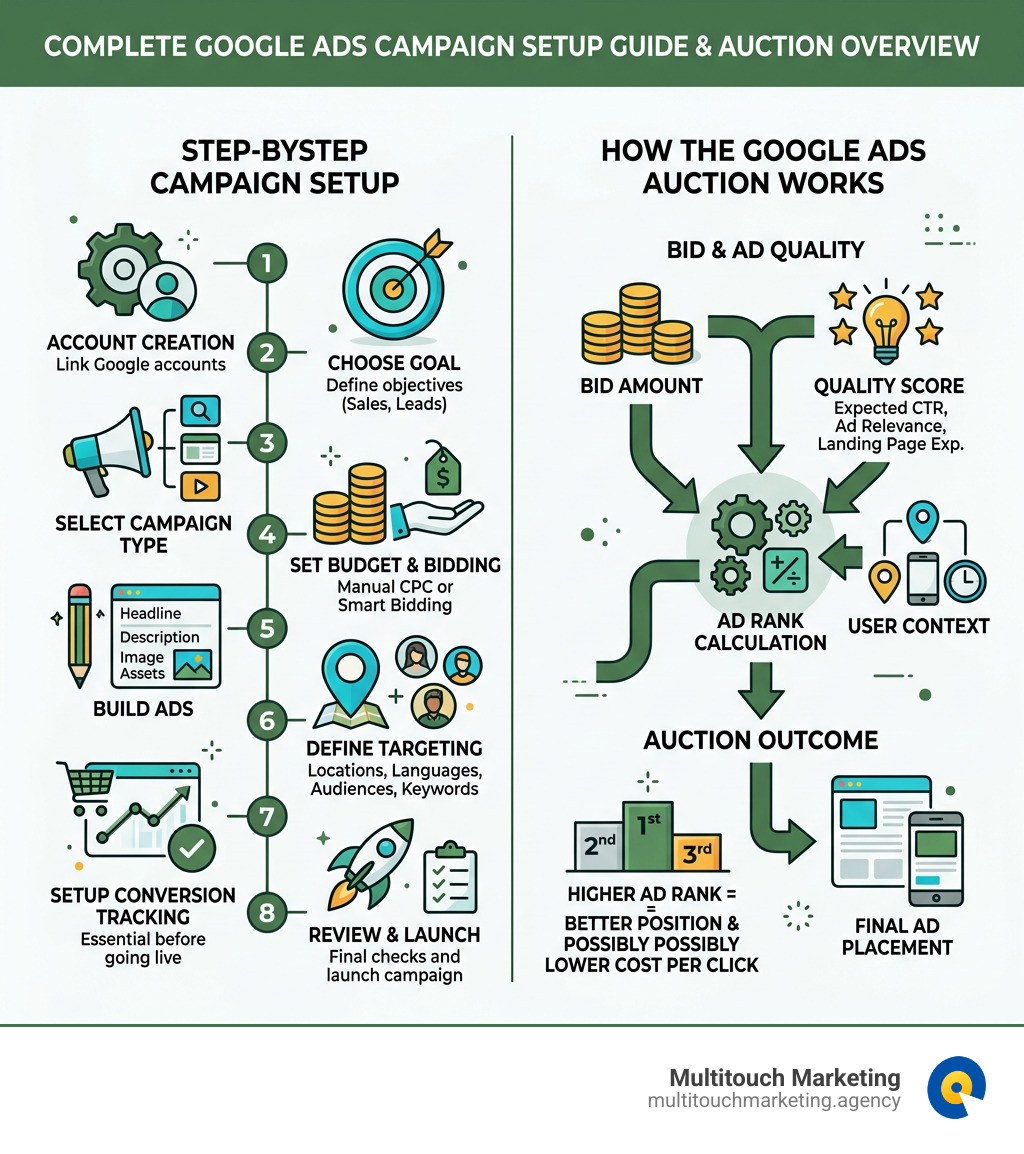
Here’s a quick overview of the core steps:
- Create a Google Ads account and link your existing Google accounts
- Choose a campaign goal (sales, leads, website traffic, or brand awareness)
- Select a campaign type (Search, Display, Performance Max, Shopping, Video, or App)
- Set your budget and bidding strategy (manual CPC or automated Smart Bidding)
- Build your ads by adding headlines, descriptions, images, and other assets
- Define your targeting — locations, languages, audiences, and keywords
- Set up conversion tracking before you go live
- Review and launch your campaign
If you’ve ever felt like Google Ads is a maze of settings, you’re not alone. Most small business owners open the platform, see dozens of options, and either click through too fast — or freeze up entirely. Both lead to the same result: wasted budget and disappointing returns.
The good news? Getting it right doesn’t require a marketing degree. It requires a clear process and an understanding of how the platform works. Businesses that invest the time to set up their campaigns properly see real results — clicks, leads, and sales that actually move the needle.
This guide walks you through every step, from opening your account to launching a campaign that’s built to perform.
My name is Milton Brown, and I’ve been managing Google Ads campaigns since 2008 — helping businesses across e-commerce, healthcare, and higher education navigate every aspect of google ad campaign setup, from small $20K budgets to multi-million dollar accounts. I’ll share exactly what works, what to avoid, and how to make every dollar count.
Basic google ad campaign setup glossary:
Understanding the Fundamentals of Google Ads
Before we dive into the buttons and menus, we need to understand how the “engine” works. Google Ads isn’t just a place where you buy space; it’s a high-speed digital auction that happens billions of times a day.
When someone searches for a service in Raleigh, NC, or watches a video in Durham, an auction triggers. But here’s the kicker: the highest bidder doesn’t always win the top spot. Google uses a metric called Ad Rank to determine who shows up first. Ad Rank is calculated using your bid amount and your Quality Score.
Your Quality Score is Google’s way of saying, “Is this ad actually helpful?” It looks at your click-through rate (CTR), ad relevance, and the quality of your landing page. If your ad is highly relevant, you can actually pay less per click than a competitor with a huge budget but a messy website.
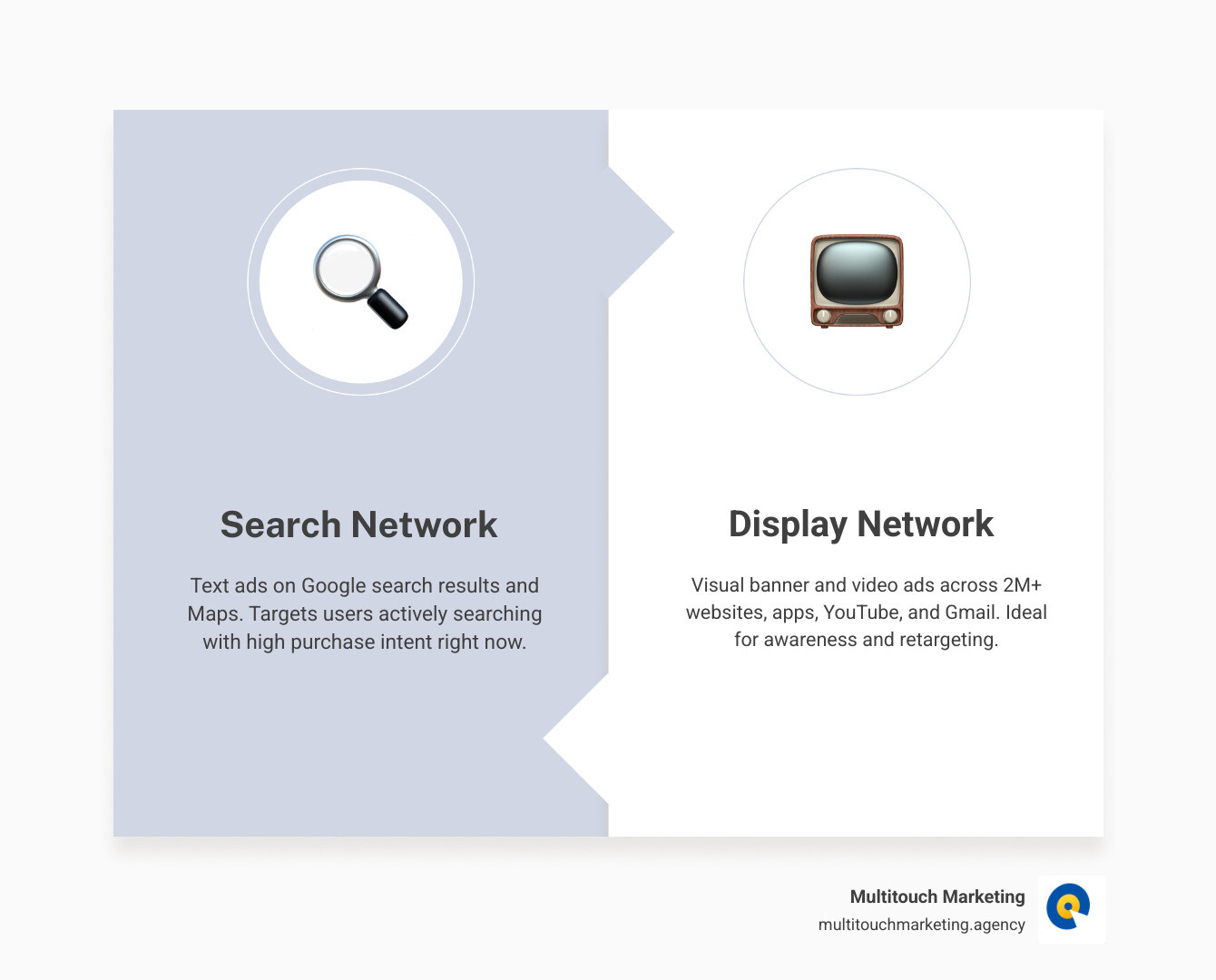
Google’s network is split into two main areas:
- The Search Network: These are the text ads you see on Google search results. They target people who are actively looking for something right now.
- The Display Network: These are visual ads (banners and videos) that appear on over two million websites and apps, including YouTube and Gmail. These are great for building brand awareness.
| Campaign Type | Primary Goal | Where it Appears |
|---|---|---|
| Search | Direct Sales & Leads | Google Search Results, Maps |
| Display | Awareness & Retargeting | 2M+ Websites, Apps, Gmail |
| Performance Max | All-in-one Conversions | YouTube, Search, Display, Discover |
Choosing the Right Google Ad Campaign Setup for Your Goals
One of the most common mistakes we see at Multitouch Marketing is choosing the wrong campaign type for a business objective. If you want phone calls for your plumbing business in Chapel Hill, a Video campaign might not be your best first step.
Here is a breakdown of the heavy hitters:
- Search Ads: The “bread and butter” of PPC. Perfect for capturing high-intent traffic.
- Performance Max (PMax): This is Google’s AI-driven powerhouse. It uses a single campaign to find customers across all of Google’s “channels” (YouTube, Search, Display, etc.). It’s fantastic for maximizing conversions but requires high-quality assets (images and videos) to work well.
- Shopping Ads: Essential for e-commerce. These show your product image, price, and store name directly in the search results.
- Video Ads: Run on YouTube to engage users with visual storytelling.
- Demand Gen: A newer type designed to drive action on visually immersive platforms like Discover and Gmail.
For a deep dive into the technical side, check out this google-adwords-campaign-setup resource or refer to the official guide to selecting campaign types.
Selecting Objectives in Your Google Ad Campaign Setup
When you click “New Campaign,” Google will ask for your objective. This isn’t just a label; it tells Google’s AI which “bidding algorithm” to use.
- Sales: Best for driving online purchases or app sales.
- Leads: Best for encouraging people to sign up for newsletters or fill out a contact form (crucial for service businesses in North Carolina).
- Website Traffic: Focuses on getting the right people to visit your site.
- Brand Awareness and Reach: Focuses on getting your name in front of as many people as possible.
Expert Tip: If you’re a seasoned pro and want full control, you can select “Create a campaign without a goal’s guidance.” This keeps every single setting open to you, though we recommend beginners stick to the guided objectives.
Audience and Location Targeting in Your Google Ad Campaign Setup
Targeting is where you stop wasting money on people who can’t buy from you. If you only serve the Triangle area, you shouldn’t be paying for clicks in California!
- Geographic Targeting: You can target by country, state, city, or even a radius around your business. For example, you can set a 20-mile radius around Raleigh, NC.
- Language Settings: Ensure you target the languages your customers speak.
- Remarketing Lists (RLSA): This allows you to show ads specifically to people who have already visited your website. Research shows that retargeted visitors are 70% more likely to convert than first-time visitors!
- Optimized Targeting: Google’s AI looks for people similar to your current customers. It’s great for expanding your reach beyond your initial list.
Step-by-Step Configuration: Budget, Bidding, and Targeting
Now we get to the money. How much should you spend, and how should you bid?
The Budget: Google asks for a daily budget. To find this, take your total monthly budget and divide it by 30.4 (the average number of days in a month). If you want to spend $3,000 a month, your daily budget is roughly $98.68. Google might spend more on some days and less on others, but it won’t exceed your monthly limit (Daily Budget x 30.4).
Bidding Strategies:
- Manual CPC: You set the maximum amount you’re willing to pay for a click. This offers the most control but requires the most work.
- Smart Bidding (Automated): This uses machine learning to optimize for conversions.
- Maximize Conversions: Tries to get the most leads for your budget.
- Target CPA (Cost Per Acquisition): You tell Google how much a lead is worth, and it tries to find them at that price.
- Target ROAS (Return on Ad Spend): Ideal for e-commerce; you tell Google you want $5 back for every $1 spent.
For more help on managing your spend, see our google-ads-budget-management guide.
Crafting High-Performance Ads and Assets
Your ad is your first impression. In a google ad campaign setup, you’ll likely use Responsive Search Ads (RSAs).
RSAs allow you to provide up to 15 headlines and 4 descriptions. Google’s AI then mixes and matches these to see which combination performs best for each individual user.
Best Practices for Ad Copy:
- Headlines: You have 30 characters. Use your keywords here! If someone searches for “PPC agency Raleigh,” your headline should ideally say “PPC Agency in Raleigh.”
- Descriptions: You have 90 characters. Focus on benefits and a clear Call to Action (CTA) like “Get a Free Audit Today.”
- Ad Strength: Google will give you a rating from “Poor” to “Excellent.” While Optmyzr data suggests higher ad strength isn’t always correlated with better performance, it’s a good “best practice” checklist to follow.
Don’t Forget Ad Assets (Formerly Extensions): Assets make your ad bigger and more helpful. They are free to add and can significantly boost your CTR.
- Sitelinks: Links to specific pages like “About Us” or “Pricing.”
- Callouts: Short snippets like “24/7 Support” or “Local Family Owned.”
- Location Assets: Shows your address in Durham or Chapel Hill, perfect for driving foot traffic.
Launching and Optimizing for Long-Term Success
You’ve hit the “Publish” button. Now what?
First, understand the Learning Phase. When you launch a new campaign or make a big change to bidding, Google’s algorithm needs time to gather data. This usually takes 1-2 weeks. During this time, performance might fluctuate—don’t panic and don’t change your settings!
Key Optimization Steps:
- Conversion Tracking: This is the most important step. If you aren’t tracking who calls or fills out a form, Google can’t optimize. Make sure your account conversion goals are active.
- The 50 Conversion Rule: For automated bidding to work its best, aim for at least 50 conversion events before making major bid changes.
- Negative Keywords: Check your “Search Terms” report. If you’re a high-end lawyer and see people searching for “free legal advice,” add “free” as a negative keyword so you don’t pay for those clicks.
- Optimization Score: Google provides a score from 0-100% with recommendations. While you shouldn’t blindly follow every suggestion, data shows that a higher Optimization Score is correlated with better performance.
Learn more about how ai-in-google-ads is changing the game, and for specific PMax tips, see this research on Performance Max setup.
Frequently Asked Questions about Google Ads
How long does it take for Google Ads to start showing?
Once you launch, your ads enter a review process. This typically takes 1-2 business days. Google checks your ad copy, images, and landing page to ensure they comply with their advertising policies. If you’re in a sensitive industry (like healthcare or finance), it might take a bit longer.
What is the Google Ads learning phase?
The learning phase is a period where Google’s machine learning gathers performance data to optimize your bids. It usually lasts 7 to 14 days. We recommend avoiding any changes to your budget or bidding during this time, as it “resets” the clock and can lead to inconsistent performance.
Why is my Google Ad campaign not getting impressions?
If your campaign is “Live” but you have zero impressions, check these common culprits:
- Bidding Constraints: Your Target CPA might be set too low for the auction.
- Low Budget: If your daily budget is smaller than the average cost-per-click, your ads won’t show.
- Targeting Restrictions: If your location or audience targeting is too narrow, there might not be enough people to show the ad to.
- Ad Disapproval: Check your “Status” column to see if your ads were rejected for policy violations.
- Billing Issues: Ensure your payment method is up to date!
Conclusion
A successful google ad campaign setup is the foundation of your digital growth. By choosing the right goals, targeting the right people in Raleigh, Durham, and Chapel Hill, and letting the AI learn without constant interference, you can turn Google Ads into a predictable lead-generation machine.
At Multitouch Marketing, we specialize in navigating the complex and dynamic nature of PPC. Whether you’re setting up your first campaign or looking for an google-ads-account-audit-checklist to fix an existing one, we’re here to help.
Ready to stop guessing and start growing? Start your professional campaign setup today with the experts at Multitouch Marketing. We’ll help you navigate the auction, improve your Quality Score, and ensure every dollar of your budget is working as hard as you do.