
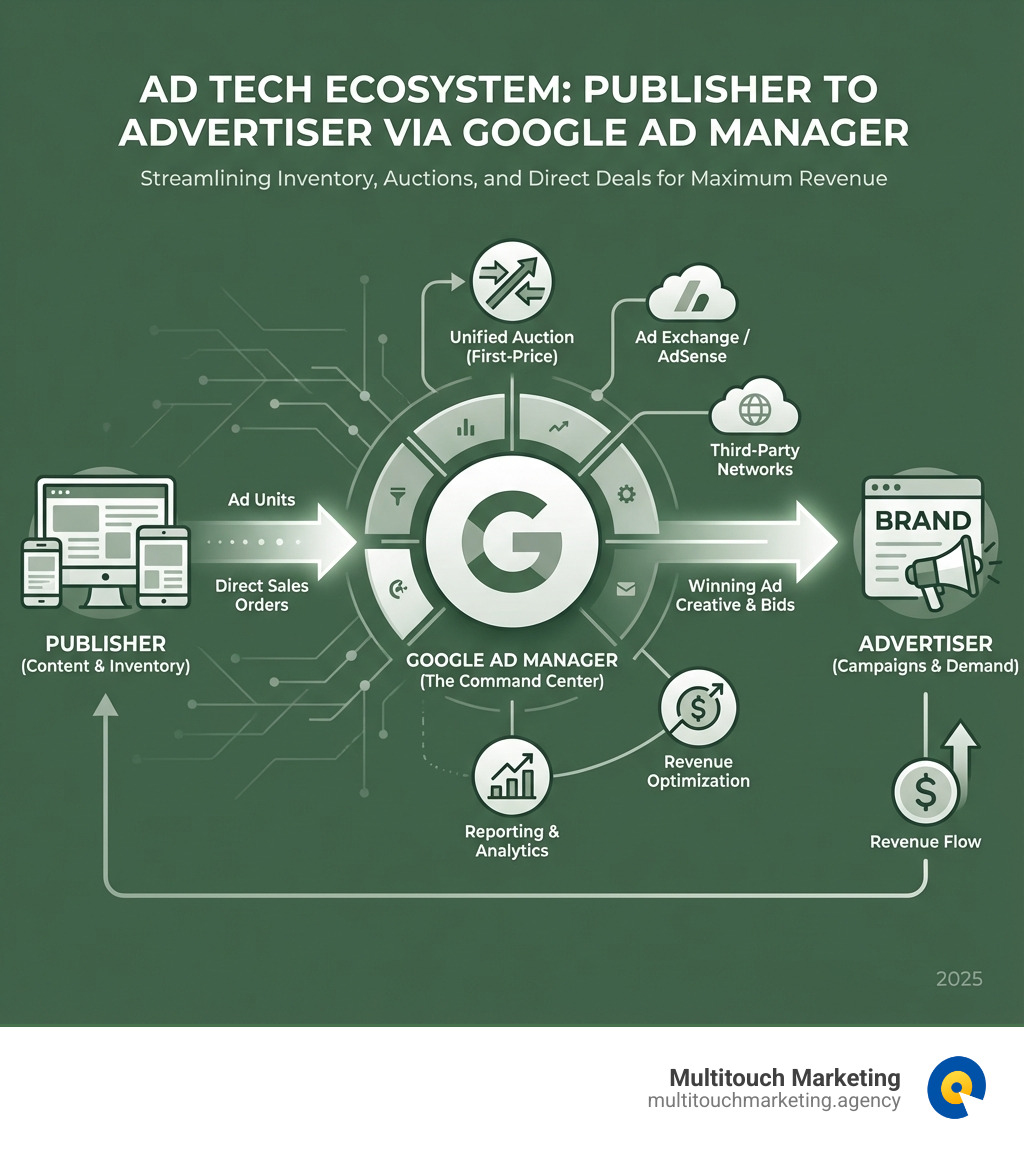
Understanding Google Ad Manager: The Publisher’s Command Center
Google advertising manager is a powerful ad management platform designed for large publishers who handle significant direct sales and need to monetize their digital inventory across websites, mobile apps, videos, and games. Here’s what you need to know:
What is Google Ad Manager?
- Platform Type: Ad management and monetization platform for publishers
- Introduced: June 27, 2018 (rebranding of DoubleClick products)
- Primary Users: Large publishers with significant direct sales
- Core Function: Centralized management of ad inventory and revenue optimization
- Auction Model: First-price auction (changed from second-price in March 2019)
- Free Version Limit: 200 million impressions per month
Key Capabilities:
- Manage inventory across multiple platforms (web, mobile, video, games)
- Support for multiple ad exchanges (AdSense, Ad Exchange, third-party networks)
- Granular targeting controls (device, geography, browser, language)
- Comprehensive reporting and analytics
- Direct deal management with advertisers
If you’re running a small advertising business or just getting started with digital ads, Google AdSense or AdMob might be better fits. Google Ad Manager is built for publishers who need enterprise-level control over their ad inventory and have substantial traffic to monetize.
The platform operates by letting publishers define ad units (specific locations where ads appear), create orders and line items (representing transactions with advertisers), and then automatically serve the highest-paying ad based on real-time auction results. This gives publishers maximum revenue potential while maintaining full control over what ads appear on their properties.
While Google Ad Manager is primarily a publisher tool, understanding how it works is crucial for any digital marketer looking to optimize their advertising strategy across the entire ecosystem. Expertise in managing paid media campaigns across various ad platforms helps organizations steer these complexities to drive measurable business outcomes.
How to Use a Google Advertising Manager: From Setup to Execution
Navigating digital advertising can feel like trying to solve a Rubik’s Cube blindfolded. But with the right tools and a clear understanding of how they work, you can bring clarity and control to your ad operations. Google Ad Manager (GAM) is one such tool, offering robust capabilities for publishers to manage their ad inventory efficiently. Let’s explore how we can get started and make the most of this powerful platform.
Signing In and Troubleshooting Access
Before we can release the full power of Google Ad Manager, we need to get through the virtual front door. Signing in is usually straightforward, but like any sophisticated system, there can be a few quirks.
To sign in, we simply visit admanager.google.com/home. You’ll be prompted to enter your Google Account username and password. It’s crucial to use the Google Account associated with your Ad Manager access. If you’re managing multiple Google Accounts (and who isn’t these days?), double-check that you’re using the correct one.

Troubleshooting Access Issues:
Sometimes, things don’t go as smoothly as we’d like. If you’re encountering issues, here are our go-to troubleshooting steps:
- Confirm You’re Using the Correct Google Account: This is the most common culprit. If you have several Google Accounts, try signing out and signing back in with the specific email address linked to your Ad Manager account. If your account is associated with multiple Ad Manager networks, you’ll be given the option to choose which one you want to access.
- Check Your User Permissions: If you’re seeing an “Unauthorized access” message, it likely means your user role lacks the necessary permissions or is not associated with the correct Team within Ad Manager. This is where your network administrator comes in handy. They can review your status and permissions under “Admin” > “Access & authorization” > “Users” in the Ad Manager interface.
- Clear Your Browser’s Cache and Cookies: Old data can sometimes interfere with login processes. Clearing your browser’s cache and cookies, or trying to sign in using an incognito/private browsing window, can often resolve these issues.
- Have an Administrator Check Your Status: If you’re still stuck, ask an administrator of your Google Ad Manager network to check your status. They can see if your account is “Active,” “Inactive,” or “Pending invitation.” If it’s “Inactive,” they can reactivate it. If it’s “Pending invitation” and the link isn’t working, they can resend the invitation.
- Google Account Recovery: If you’re unsure of the correct email address or password for your Google Account, Google’s robust account recovery process is your best friend.
For those of us helping clients steer these waters, having a solid Google Ads Account Audit Checklist can also help identify any underlying account configuration issues that might be impacting access or performance.
Core Functions of a Google Advertising Manager
Once we’re in, we’ll find that Google Ad Manager is a veritable powerhouse for managing digital ad inventory. Its core functions revolve around making sure the right ad gets to the right user at the right time, maximizing revenue for publishers.
- Inventory Management: At its heart, GAM is about managing your ad “real estate.” This involves defining ad units, which are specific locations on your website, mobile app, video player, or game where ads can be displayed. Think of them as designated billboards on your digital properties. Once defined, GAM generates ad tags – snippets of code that we embed into our content. These tags communicate with GAM, telling it when and where to request an ad.
- Campaign Execution: This is where the magic happens. Publishers create orders within GAM, which represent agreements with advertisers. Within each order, we define line items. A line item specifies the details of an ad campaign, such as the ad creative, target audience, delivery dates, pricing model (e.g., CPM, CPC), and, crucially, which ad units it can target.
- First-Price Auction Model: When a user visits a page with an ad tag, GAM springs into action. It gathers bids from various sources – direct deals, AdSense, Ad Exchange, and third-party networks. In March 2019, GAM transitioned from a second-price to a first-price auction format. This means the highest bidder wins the impression and pays the exact amount they bid, rather than just a penny more than the second-highest bidder. This change was significant for publishers, aiming for more transparency and potentially higher revenue. Our goal is to ensure our clients’ direct deals and programmatic channels compete effectively in this environment.
Managing these elements effectively is key to generating optimal revenue. For those looking to dive deeper into the technical setup, our resources on Google AdWords Campaign Setup can offer additional guidance on initial configurations.
Key Features for Campaign Success
The real beauty of Google Ad Manager lies in its advanced features that give publishers unparalleled control and insight into their ad operations. We’re not just throwing ads onto a page; we’re strategically placing them for maximum impact and profitability.
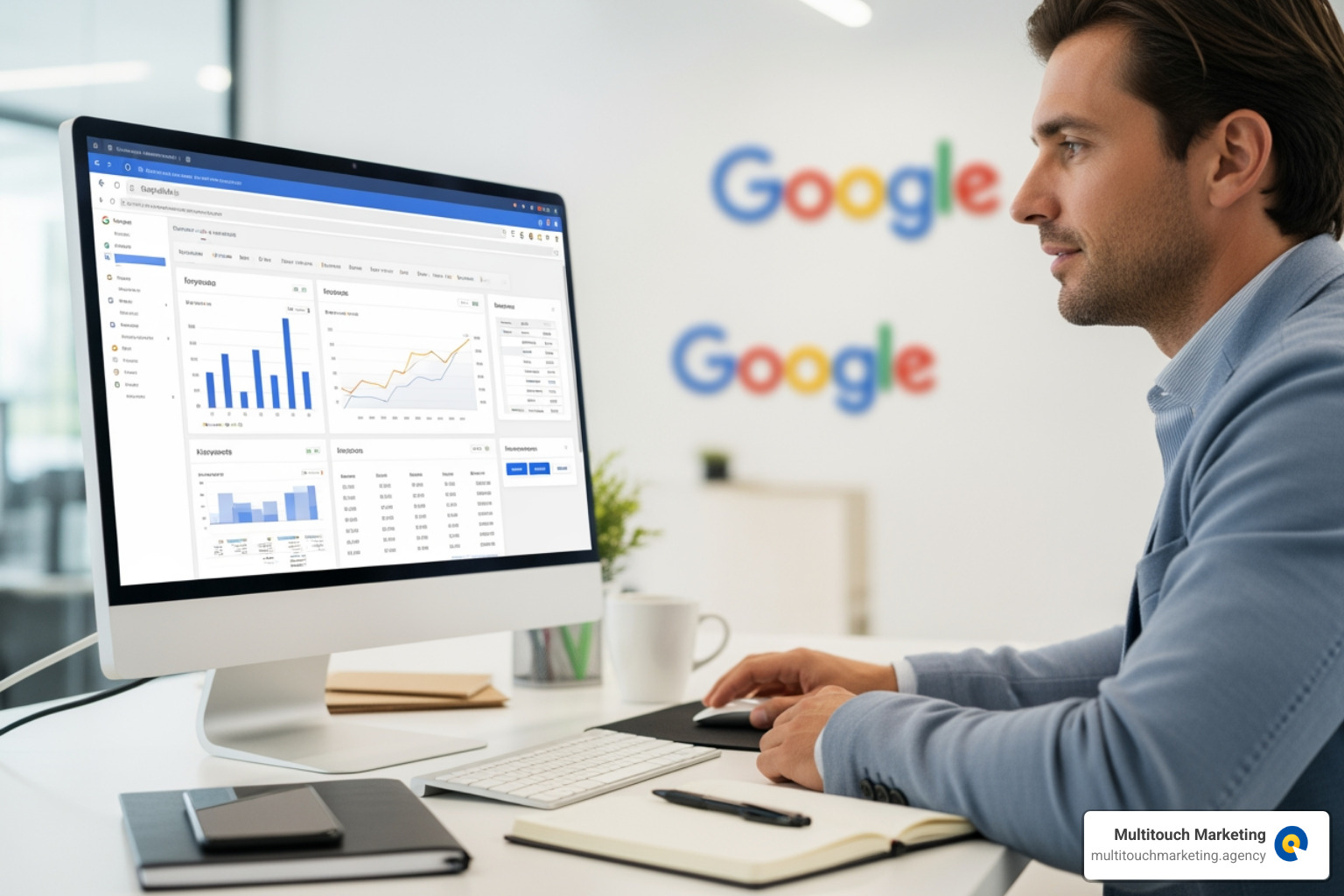
- Granular Controls: GAM offers incredibly detailed controls. We can define precisely when, where, and to whom ads are shown. This includes targeting based on:
- Device: Desktop, mobile, tablet.
- Browser: Chrome, Firefox, Safari, etc.
- Operating System: iOS, Android, Windows.
- Geographical Location: Down to specific cities or regions, which is especially useful for businesses looking to serve locally relevant ads.
- Language: Ensuring ads resonate with the user’s preferred language.
- Audience Segments: Leveraging first-party data to reach specific user groups.
- Robust Reporting Features: Data is king, and GAM provides a treasure trove of it. We can generate customizable reports on:
- Campaign Performance: How well specific campaigns are delivering impressions, clicks, and revenue.
- Creative Performance: Which ad creatives are most engaging.
- Network Performance: Insights into the overall health and performance of our ad network.
- Ad Unit Performance: Identifying our most valuable ad placements.
- Geographical Performance: Understanding where our audience is and which regions are most profitable. These reports are vital for identifying trends, optimizing strategies, and making data-driven decisions to boost revenue.
- Support for Multiple Networks and Exchanges: A significant advantage of GAM is its ability to integrate and manage demand from various sources. This includes:
- AdSense Integration: Seamlessly allowing AdSense to fill unsold inventory.
- Ad Exchange (AdX): Google’s real-time bidding exchange for premium inventory.
- Third-Party Networks and Exchanges: Integrating with other ad networks and SSPs (Supply-Side Platforms) to ensure maximum competition for every impression. This holistic approach ensures that publishers are always getting the best possible price for their inventory.
Our experience shows that leveraging these capabilities, especially with Advanced PPC Techniques, can significantly improve performance and ROI for our clients.
Is Google Ad Manager the Right Choice for Your Business?
Deciding whether Google Ad Manager is the right fit for your business is like choosing the right tool for a specific job. While it’s incredibly powerful, it’s not a one-size-fits-all solution. Understanding its nuances and comparing it with other Google advertising products can help us make an informed decision.
Google Ad Manager vs. Google Ad Manager 360
Think of these two as siblings – similar DNA, but one has a few more bells and whistles (and a higher price tag!).
| Feature | Google Ad Manager (Free) | Google Ad Manager 360 (Paid) |
|---|---|---|
| Target Audience | Small to medium-sized publishers | Large, enterprise-level publishers |
| Cost | Free up to a certain impression threshold | Requires a paid contract and upfront commitment |
| Impression Limit | Up to 200 million impressions per month | Significantly higher, customizable limits |
| Support | Community-based support, limited Google support | Direct, dedicated Google support |
| Advanced Features | Core ad serving, inventory management, basic reporting | Audience Solutions, Open Bidding, Data Transfer Reporting, advanced forecasting, more granular controls, higher API limits |
| Reporting Depth | Standard reports | More detailed, customizable, and exportable data |
| SLA (Service Level Agreement) | No | Yes |
The standard Google Ad Manager is an excellent choice for growing publishers who have started to accumulate significant direct sales and need more control than basic ad services offer, but haven’t yet reached the scale of a massive enterprise. It’s free to use until you hit that 200 million impression per month mark, at which point a paid contract might come into play.
Google Ad Manager 360, on the other hand, is designed for the big leagues. It offers features like Audience Solutions, which allows for more sophisticated audience segmentation and targeting, and Open Bidding, which enables server-to-server bidding from multiple exchanges, leading to even greater competition for impressions. For a deeper dive into these distinctions, Yieldbird’s comparison is a valuable resource. Making the right choice requires careful consideration of a business’s current scale and future growth ambitions.
How GAM Differs from AdSense and AdMob
Google’s advertising ecosystem can be a bit like a family tree – lots of related products, each with its own niche. Understanding the difference between Google Ad Manager, AdSense, and AdMob is crucial for selecting the right tool.
- Google AdSense: This is Google’s entry-level ad serving platform, primarily for smaller publishers and bloggers. It’s incredibly easy to set up: you place a code snippet on your website, and Google automatically serves relevant ads. AdSense manages the ad selection, targeting, and payment, offering a hands-off approach. It’s designed for quick monetization with minimal configuration.
- Google AdMob: Similar to AdSense, but specifically custom for mobile app developers. AdMob allows developers to monetize their apps with various ad formats (banner, interstitial, rewarded video, native) and handles the ad serving and payments. It’s optimized for the mobile app environment.
- Google Ad Manager (GAM): As we’ve discussed, GAM is the big brother. It’s designed for publishers who have their own direct sales teams, manage complex ad operations, and need to control multiple demand sources (AdSense, AdX, third-party networks, and direct deals) from a single platform. It offers granular control over inventory, pricing, targeting, and reporting that AdSense and AdMob simply don’t provide.
When to Use Each Platform:
- Use AdSense or AdMob if you’re a smaller publisher or app developer with a relatively simple ad setup, primarily relying on Google’s automated ad placement, and don’t have significant direct sales relationships. They are excellent for ease of use and quick monetization. For small businesses looking to get started with PPC, these can be good entry points before scaling up to more complex solutions. Our PPC Management for Small Business services can help guide these initial steps.
- Use Google Ad Manager if you:
- Are a large publisher with a dedicated sales team selling ad space directly to advertisers.
- Need to manage ad inventory across multiple platforms (website, app, video).
- Want to integrate and optimize revenue from various demand sources (direct deals, AdSense, AdX, other ad networks).
- Require sophisticated targeting capabilities and detailed reporting.
- Need to manage brand safety and advertiser-specific requirements.
AdSense and AdMob are about simplicity and automation for smaller-scale monetization, while Google Ad Manager is about comprehensive control and optimization for large-scale, complex ad operations.
Benefits, Challenges, and the Future of Ad Management
We’ve explored what Google Ad Manager is and how it functions, but let’s take a moment to consider why publishers choose this path and what problems they might encounter. Understanding these aspects is crucial for any business looking to integrate GAM into their strategy.
The Main Benefits of Using a Google Advertising Manager
For large publishers, the benefits of using a centralized platform like Google Ad Manager are substantial, changing ad operations from a chaotic scramble into a streamlined, revenue-generating machine.
- Centralized Revenue Management: Imagine juggling multiple ad networks, direct deals, and programmatic channels – it’s a headache waiting to happen. GAM consolidates all these demand sources into one powerful platform. This allows us to see all our ad revenue streams in a single dashboard, simplifying management and providing a holistic view of performance. This centralized control is invaluable for optimizing our overall ad strategy.
- Maximized Yield: GAM’s ability to orchestrate a real-time auction among all demand sources (direct deals, AdSense, AdX, third-party networks) ensures that every ad impression is sold to the highest bidder. This competitive environment, especially with the first-price auction model, is designed to maximize the revenue generated from every single ad slot. For a publisher, this means earning more from the same amount of traffic. Publishers appreciate this focus on maximizing their digital assets’ value.
- Granular Control Over Ad Inventory: Publishers gain unparalleled control over what ads appear on their properties, where they appear, and to whom. This includes setting specific targeting criteria, frequency capping, competitive exclusions, and brand safety measures. This level of control protects a publisher’s brand, improves user experience, and ensures that advertisers’ campaigns are delivered effectively.
- Scalability for Growing Businesses: Google Ad Manager offers robust tools that scale to the needs of growing businesses. Whether you’re expanding your website, launching new apps, or venturing into video content, GAM can handle the increased complexity and volume of ad inventory. It’s built to grow with you, making it a sustainable choice for long-term ad management. This scalability is a core reason why PPC Advertising is Beneficial in Business for those aiming for significant growth.
In our work at Multitouch Marketing, we see how these benefits translate into tangible results for our clients, allowing them to focus on content creation while we ensure their ad revenue is optimized.
Navigating Potential Problems and Antitrust Concerns
While Google Ad Manager offers undeniable advantages, it’s not without its complexities and controversies. As digital marketing professionals, we believe in a clear-eyed view of any platform we use.
- Platform Complexity and Learning Curve: GAM is a powerful tool, but with great power comes a significant learning curve. It’s not as simple as AdSense’s “set it and forget it” model. Publishers need dedicated ad operations teams or expert partners (like us!) to configure, manage, and optimize campaigns effectively. Understanding ad units, line items, targeting, and reporting requires specialized knowledge, which can be a barrier for some.
- Requirement for Significant Direct Sales: While GAM integrates programmatic demand, it truly shines for publishers who have a substantial amount of direct sales. If your primary monetization strategy is solely through automated programmatic channels, the full suite of GAM’s features might be overkill, and its complexity could outweigh the benefits.
- Antitrust Scrutiny and Concerns: This is perhaps the most significant challenge facing Google’s advertising technology stack. In 2023, the Justice Department, along with Attorneys General from several states, filed a civil antitrust suit against Google. The core allegation was that Google had monopolized multiple digital advertising technology products, violating Sections 1 and 2 of the Sherman Act. The suit claimed that Google “willfully engaged in a series of anticompetitive acts to acquire and maintain monopoly power in the publisher ad server and ad exchange markets.” This legal action highlights the intense scrutiny on large tech companies and their dominance in the digital advertising space. For publishers using Google Ad Manager, these antitrust concerns introduce an element of uncertainty regarding the future regulatory landscape and potential changes to how Google operates its ad tech. It is important to monitor these developments to ensure strategies remain compliant and robust.
These challenges underscore the need for expertise and adaptability when working with sophisticated ad management platforms. We constantly monitor the industry landscape to provide our clients with the most current and effective strategies.
Conclusion: Taking Control of Your Ad Revenue
In the dynamic world of digital publishing, where every impression counts, mastering your ad operations is paramount. Google Ad Manager stands out as an indispensable tool for large publishers seeking to centralize, control, and optimize their ad revenue. We’ve seen how this powerful platform, born from the evolution of DoubleClick, provides the granular control, comprehensive reporting, and multi-demand source integration necessary to thrive in a competitive market.
From defining ad units and executing campaigns via orders and line items, to leveraging advanced targeting and intricate reporting, GAM empowers publishers to make informed decisions that drive profitability. While its complexity and the ongoing antitrust discussions present certain considerations, the benefits of maximized yield, centralized management, and scalability for growth are undeniable.
For publishers everywhere, understanding and effectively utilizing Google Ad Manager means taking full control of their digital destiny. It’s about ensuring that your valuable content is monetized efficiently, allowing you to continue creating the engaging experiences your audience craves.
At Multitouch Marketing, we specialize in helping businesses steer these intricate digital landscapes. Our Google Ads Campaign Management Services are designed to ensure you not only understand platforms like Google Ad Manager but also implement strategies that deliver measurable results and propel your business forward. We believe in using the full potential of your ad revenue, turning complexity into opportunity, and ensuring your advertising efforts are always working smarter, not just harder.