
Why a Google Shopping Management Company Can Make or Break Your eCommerce Growth
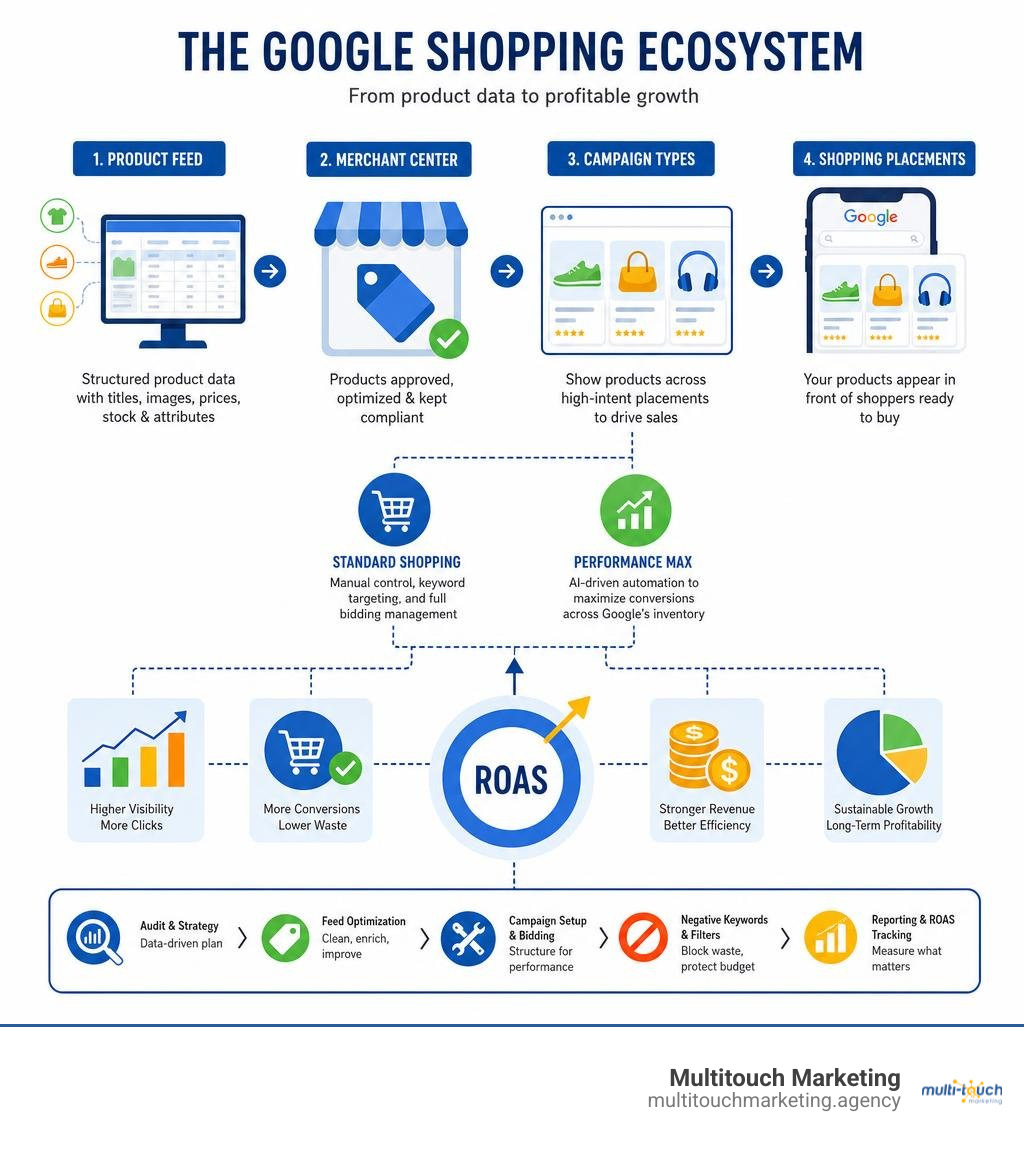
A google shopping management company is a specialized digital marketing agency that handles every layer of your Google Shopping presence — from product feed setup to bid strategy to Merchant Center compliance — so your products show up in front of buyers who are ready to purchase.
Here’s what a Google Shopping management company typically does:
- Product feed optimization — cleans and structures your product data so Google can match it to the right searches
- Merchant Center management — sets up, monitors, and fixes your product listings and policy compliance
- Campaign structure and bidding — builds Standard Shopping and/or Performance Max campaigns with smart bid strategies
- Negative keyword management — blocks irrelevant searches that drain your budget
- Reporting and ROAS tracking — measures real revenue impact, not just clicks
Google Shopping ads don’t work like regular search ads. Instead of bidding on keywords, Google reads your product feed data to decide when and where your products appear. That makes feed quality — not just ad spend — the biggest lever for performance. In fact, research from agency practitioners suggests that roughly 80% of Shopping ROAS lift comes from feed engineering alone.
For small business owners managing inventory, orders, and customer service all at once, that level of technical detail is easy to underestimate. Most businesses that struggle with Google Shopping don’t have a budget problem — they have a setup and optimization problem.
I’m Milton Brown, a paid media strategist with experience since 2008 managing accounts from $20,000 to $5 million in budget across e-commerce, education, and healthcare — including complex google shopping management company engagements across multiple verticals. In this guide, I’ll walk you through exactly how professional Shopping management works and what to look for when choosing a partner.
Google shopping management company terms to know:
What is a Google Shopping Management Company?
To understand what a google shopping management company does, we must first look at the unique engine behind Google Shopping. Unlike traditional text-based search ads where you bid on specific keywords, Google Shopping campaigns run on a completely different framework. They rely entirely on your product data, housed inside Google Merchant Center.
A professional Google Shopping management agency acts as the architect and operator of this entire system. They don’t just log in and adjust bids; they manage the delicate pipeline that connects your e-commerce platform (like Shopify, WooCommerce, or Magento) to Google’s complex ad network.
To put this in perspective, let’s look at how Google Shopping differs from standard Search ads and newer Performance Max (PMax) setups:
| Feature | Standard Google Search Ads | Standard Google Shopping Ads | Performance Max (PMax) Campaigns |
|---|---|---|---|
| Primary Targeting Method | Keywords selected by the advertiser | Product feed attributes in Merchant Center | Automated audience signals, product feed, and assets |
| Ad Formats | Text-based headlines and descriptions | Visual product cards (Image, Price, Title, Store Name) | Dynamic mix of Search, Shopping, Display, YouTube, and Gmail |
| Where Ads Appear | Google Search Results, Search Partners | Google Search, Google Images, Google Maps, Shopping Tab | All Google Channels (YouTube, Gmail, Display, Search, Maps) |
| Control Over Bidding | High (Manual CPC, Portfolio Bids, Target CPA/ROAS) | High (Manual CPC, Maximize Clicks, Target ROAS) | Low (Fully automated Smart Bidding driven by Google AI) |
| Negative Keyword Control | Complete keyword-level exclusion | High (Exclusions applied at campaign/group level) | Limited (Requires account-level lists or support requests) |
When we manage these systems, our goal is to maximize your Return on Ad Spend (ROAS) and increase your overall conversion value. By structuring your campaigns efficiently, we ensure that your budget is funneled directly into high-intent searches. Because Shopping ads display your product image, title, and price upfront, the traffic generated is pre-vetted. Shoppers who click your ad already know what your product looks like and how much it costs, which naturally leads to a higher conversion rate compared to standard text ads.
Core Services of a Google Shopping Management Company
A comprehensive google shopping management company provides a suite of deeply technical services designed to keep your products visible and profitable. It is far more than a “set it and forget it” task. When you partner with us for Google Ads Campaign Management Services, we handle several critical workstreams:
- Feed Creation and Optimization: We don’t just import your store catalog and hope for the best. We rewrite titles, map precise product categories, clean up descriptions, and optimize your images to meet Google’s strict standards.
- Merchant Center Setup and Policy Compliance: Google is highly strict about data consistency. If your website price differs by even a single penny from your feed price, or if your shipping policy is unclear, Google will suspend your account. We actively monitor the Diagnostics tab to prevent and resolve disapprovals.
- Strategic Campaign Architecture: We design campaign structures that separate your top-performing products from your “Zombie SKUs” (products that receive zero impressions). This prevents a handful of average products from consuming your entire daily budget.
- Bid Strategy Optimization: Whether utilizing manual bidding for granular control or training Google’s Smart Bidding AI with high-quality conversion signals, we balance your bids to protect your profit margins.
- Dynamic Remarketing: We set up tracking so that shoppers who viewed specific products on your store are served those exact products as they browse other sites across the Google Display Network.
How to Choose the Right Google Shopping Management Company
Selecting the right partner to manage your ad spend is a major business decision. Not all agencies are built the same, and choosing a generalist agency over a specialized google shopping management company can result in wasted budget and missed opportunities.
When evaluating agencies, look for these critical factors:
- Google Partner or Premier Partner Status: A certified Google Partner has demonstrated campaign management proficiency and met spend requirements. A Premier Partner represents the top 3% of agencies in a given country, demonstrating a proven track record of scaling client revenue.
- Transparent Pricing Models: Most reputable agencies charge either a flat monthly fee, a tiered fee based on ad spend, or a percentage of ad spend (typically ranging from 7% to 15%). Avoid agencies that hide their fees inside your media spend; you should always have direct access to your Google Ads billing.
- E-commerce Specialization: Ask the agency how they handle inventory synchronization, custom labels, and margin-based bidding. If they only talk about keywords and text ads, they likely lack the deep e-commerce expertise required for Shopping success.
- Local Accessibility: If you are operating in North Carolina—specifically around Raleigh, Durham, or Chapel Hill—working with a local team that understands the regional business landscape can provide a distinct communication advantage. We pride ourselves on offering tailored PPC Management for Small Business that aligns directly with your local market dynamics.
Feed Engineering: The Engine of Shopping ROAS
If you take only one lesson from this guide, let it be this: your product feed is your targeting. Because there are no keywords to bid on in a pure Google Shopping campaign, Google’s algorithms read your feed to determine if your product matches a shopper’s search query. Feed engineering is where professional agencies generate up to 80% of their ROAS improvements.
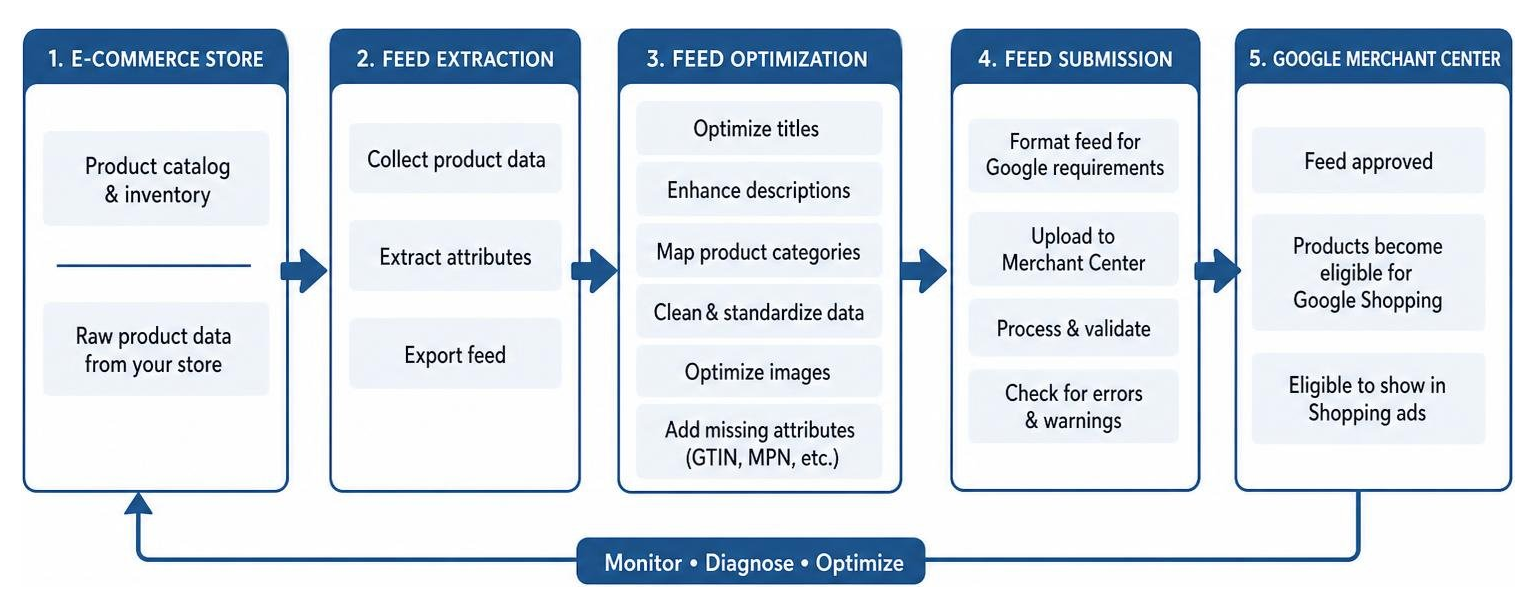
To get your products displayed in front of millions of high-intent buyers, you must first master the Promote Your Business with Merchant Center – Google for Retail platform. This is where your raw inventory data is transformed into a highly optimized feed that Google can easily interpret.
Crucial feed attributes that must be engineered include:
- GTIN (Global Trade Item Number): This is the most critical attribute for branded products. By providing an accurate GTIN, you allow Google to instantly identify the exact product you are selling, placing you in competitive auctions with high-converting search queries.
- Google Product Category: While Google can guess your category, manually mapping your products to the deepest level of Google’s taxonomy ensures you are positioned accurately against your competitors.
- Custom Labels (0-4): These are internal tags used to segment your catalog. We use custom labels to group products by profit margin, performance (e.g., “Best Sellers,” “Zombies,” “Seasonal”), or stock levels, allowing for highly strategic bidding.
Optimizing Titles and Attributes for Smart Bidding
When writing product titles for your online store, you write them for human shoppers. However, when optimizing your Google Shopping feed, you must write them for algorithmic reading by Smart Bidding, while still keeping them attractive to human searchers.
Expert agencies use a strategy called front-loading. Because Google search results often truncate product titles after 70 characters, the most critical, high-volume search terms must appear at the very beginning of your title.
Let’s look at a real-world example of how we transform a standard store title into an optimized, search-friendly title:
- Before (Standard Store Title): “Classic Leather Tote”
- After (Optimized Feed Title): “Women’s Classic Leather Tote Bag – Navy Blue, Large Shoulder Purse with Zipper”
By adding the target gender, material, product type, color, size, and style attributes, we drastically expand the number of relevant search queries this product can match. This simple change can double or triple your product’s visibility overnight.
Advanced Campaign Structures and Bidding Strategies
Once your product feed is engineered to perfection, the next step is building a campaign structure that gives you complete control over your budget. A common mistake made by inexperienced advertisers is dumping their entire product catalog into a single, unstructured campaign. This leads to a situation where a few low-margin products eat up the entire daily budget, leaving your actual best-sellers with zero visibility.
To prevent this, we build segmented campaign architectures designed to isolate and scale your most profitable SKUs.
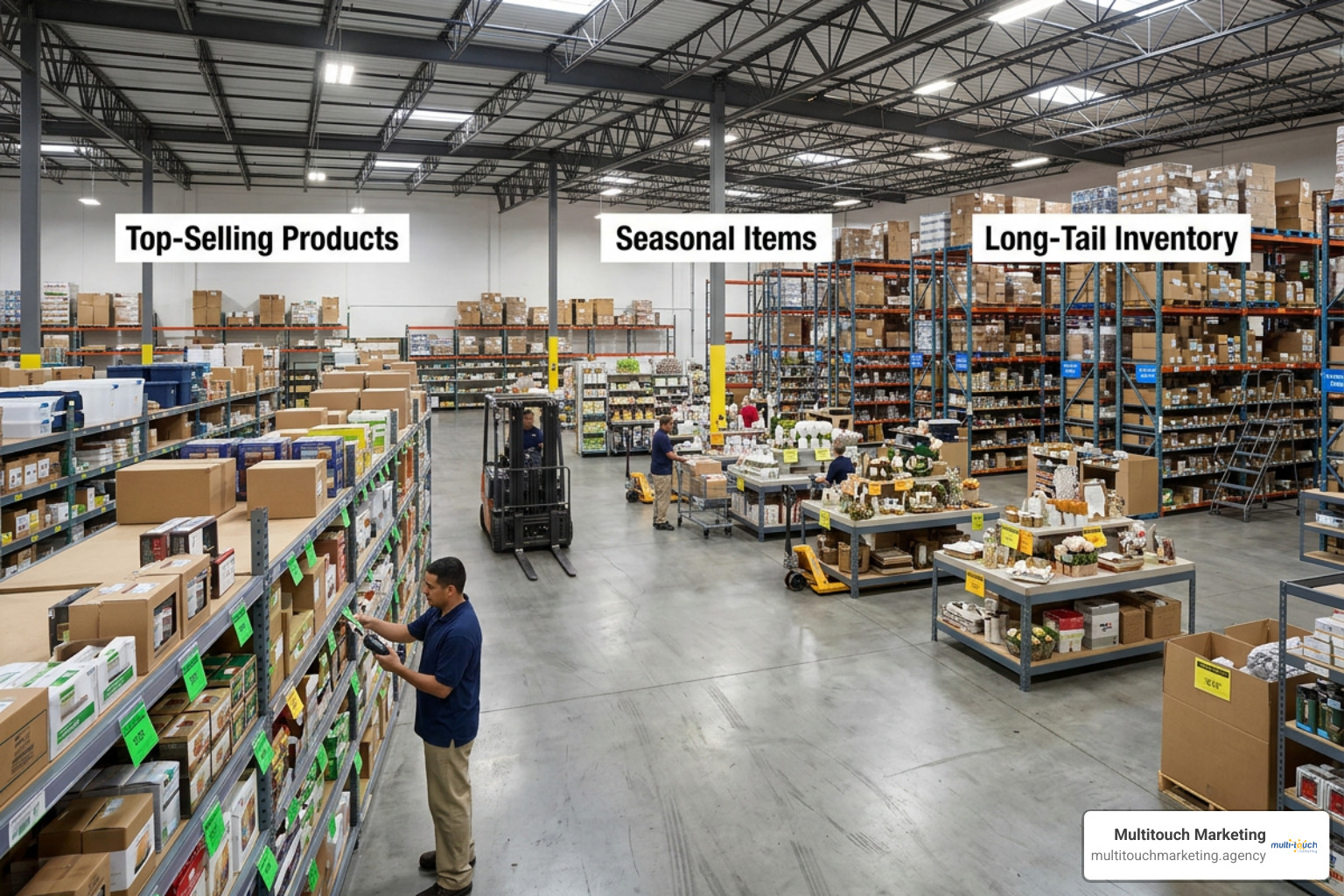
When we perform a comprehensive Google Ads Account Audit Checklist, one of the first things we look at is how budgets are allocated across product groups. By segmenting your campaigns, we can apply different bidding strategies and ROAS targets depending on the actual business value of each product.
Standard Shopping vs. Performance Max Setup
The introduction of Performance Max (PMax) changed the e-commerce advertising landscape. PMax uses Google’s advanced AI to automatically optimize bids and placements across Search, Shopping, YouTube, Display, and Gmail. However, relying only on PMax can be a double-edged sword. PMax campaigns tend to focus heavily on your top-performing, high-volume products, often leaving the rest of your catalog completely ignored.
To solve this, we often implement a hybrid approach. By running both Standard Shopping and Performance Max campaigns simultaneously, we can capture the best of both worlds:
- Performance Max is used to aggressively scale your core, high-margin catalog across all Google networks, utilizing audience signals and automated bidding to find new customers.
- Standard Shopping is deployed to capture highly specific, long-tail search queries that PMax might under-bid on. This keeps your entire inventory active and prevents “Zombie SKUs” from sitting dormant in your feed.
E-commerce brands that transition from a PMax-only setup to this coordinated, hybrid campaign structure frequently experience a 25% to 40% lift in overall Shopping revenue.
Managing Negative Keywords and Query Sculpting
One of the biggest advantages of Standard Shopping over Performance Max is the ability to use negative keywords. Because Shopping ads are feed-driven, Google will occasionally display your products for searches that have very low purchase intent.
For example, if you sell premium, high-end leather bags, you do not want your ads appearing when someone searches for “cheap synthetic bags” or “how to repair a leather purse.”
To protect your budget, we perform weekly search term mining to identify and block these wasteful searches. In Standard Shopping, we can also use a technique called query sculpting. By using multiple campaigns with different priority settings (High, Medium, Low) and shared negative keyword lists, we can route generic search terms (e.g., “shoes”) to one campaign with a low bid, and highly specific search terms (e.g., “red running shoes size 10”) to another campaign with a higher bid. This ensures you only pay top dollar for the searches most likely to convert.
Frequently Asked Questions about Google Shopping
Navigating e-commerce advertising can be overwhelming. Here are some of the most common questions we hear from business owners looking to scale their online sales.
How long does it take to see results from professional management?
While you can technically start receiving clicks and sales on the very first day your campaigns go live, the optimization process is a journey. Google’s Smart Bidding algorithms require a “learning phase” to gather enough conversion data to make accurate bidding decisions.
Typically, the timeline looks like this:
- Days 1 to 30: The setup and learning phase. We optimize your feed, launch the new campaign structure, and begin gathering initial search term data.
- Days 30 to 60: The refinement phase. We apply negative keywords, resolve any lingering Merchant Center issues, and adjust bids based on early performance signals.
- Days 60 to 90: The scaling phase. With a mature data set, we can confidently push budgets into your highest-performing campaigns to maximize ROAS.
Why are my Google Shopping products getting disapproved?
If you notice your impressions suddenly dropping, a wave of product disapprovals inside Google Merchant Center is usually the culprit. Google regularly updates its policies to protect shoppers, and even minor data mismatches can trigger a suspension.
Common reasons for disapprovals include:
- Price or Availability Mismatches: If your feed says a product is in stock for $20, but your website checkout says it is out of stock or costs $25, Google will flag the listing.
- Missing Unique Product Identifiers: For branded items, failing to provide accurate GTINs, MPNs, or brand names will result in limited visibility or outright disapproval.
- Inadequate Shipping or Tax Data: Google requires clear, transparent shipping costs and tax calculations during the checkout process. If your settings in Merchant Center don’t match your store’s actual shipping policies, your products may be taken down.
Do I still need Standard Shopping if I run Performance Max?
Yes, we highly recommend keeping Standard Shopping active alongside your Performance Max campaigns. While PMax is incredibly powerful for scaling high-intent traffic, it operates largely as a “black box,” giving you very little visibility into which search terms triggered your ads.
By running a companion Standard Shopping campaign, you retain a valuable layer of control. It allows you to bid on specific long-tail search queries, test new products before moving them into PMax, and gather precise keyword data that can be used to inform your overall SEO and content marketing strategies.
Conclusion
Succeeding in the highly competitive e-commerce landscape of 2026 requires more than just a healthy advertising budget. It requires a deep, scientific understanding of feed engineering, Merchant Center compliance, and advanced campaign architecture.
As a specialized digital marketing agency with deep roots in North Carolina—serving businesses across Raleigh, Durham, and Chapel Hill—we at Multitouch Marketing specialize in navigating these exact complexities. We don’t believe in “set it and forget it” campaign management. Instead, we take a hands-on, data-driven approach to ensure every single dollar of your ad spend is working to grow your bottom line.
If you’re ready to move past basic ad setups and unlock the true revenue potential of your product catalog, reach out to us today for a personalized Google Ads Consulting session. Let’s work together to build a high-performing Google Shopping strategy that drives sustainable, profitable growth for your business.